
Portion Sizes For Weight Loss
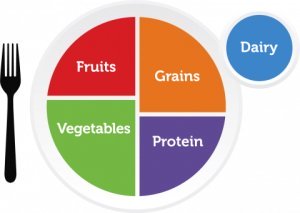
Eating the right portion sizes is important for weight loss. Understanding the proper portions is a learning process and can be challenging at first.
People tend to eat all of what is served to them on their plates. Because of this mindset, it's important to only fill your plate with the proper portions of the various food groups.
With some small changes in the way you eat and think of as “food portions” can get you eating healthier and losing weight.
Making Changes
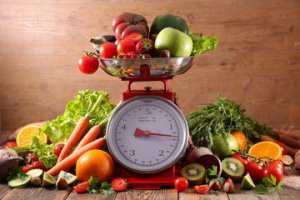
While it's near impossible to measure every morsel that passes your lips, you can make changes to ensure you are eating healthier with the proper portion sizes.
Start by measuring your foods and beverages when you can until you get a feel for the right portions. It is a super-sized world out there, and most people are surprised to find that their idea of a single serving is actually two or even three. So measuring when you can is critical to changing your mindset of what is the correct amount for each food group.
If you are into bells and whistles, there are food scales that are pre-programmed with nutritional information, as well as scales that will keep a running total of your daily food and nutrient intake for you. However, the only tools you really need are a simple and inexpensive food scale, dry and liquid measuring cups, and learning how to read food labels.
Understanding Portion Sizes
We often relate a serving size to the amount of a particular food that is put on our plates like at restaurants. Unfortunately this gives us a distorted view of what true portion sizes are for that food item.
Portions served to us are in most cases more than a true serving size. This makes food portion control more difficult. We also do not often measure our foods even when at home and “guess” at what a ½ cup is or 1 serving of a food item. This again is usually a misleading view of a true portion size if you have never had some visual to measure against.
Unless you have some method to visualize your portions or take the time to physically measure all your food items, then you are risking eating more than the true portion size and will be consuming more calories than you are expecting.
Measuring is a great way to get a feel for a real serving size and helps you learn food portion control. However, you can get a general idea of a portion size if you have something to relate to the serving size. Use the list below as a general rule of thumb when placing portions on your plate.
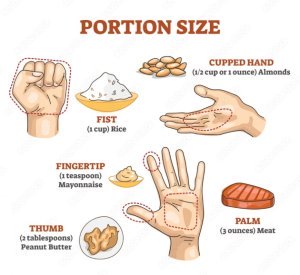
- A woman's fist or the size of a baseball equals one serving of vegetables or fruit.
- A rounded handful is about 1/2 cup of cooked rice or pasta.
- The size of a deck of cards is approximately 3 ounces of meat, which is a typical serving size.
- A golf ball or the size of a large egg is about 1/4 cup of nuts.
- A computer mouse is about the size of a small potato.
Measuring is still the best way to ensure you have the right portion size. Once you have measured your foods for awhile you will get a better feel for the right serving sizes. If you are unsure if you have the right size, try putting less on your plate and then if you are still hungry, then go for a second “half” portion to play it safe.
USDA Portion Sizes
The US Government food pyramid is no longer. It has been replaced with the "MyPlate" icon. According to the "MyPlate" there are six food groups which should make up your daily meals. These groups include grains, vegetables, fruits, oils, milk and proteins. Vegetables should take up the largest portion of the plate. The proper food portion sizes you need for each of these groups will depend on your age, gender and level of activity.
Use the links below to go to the specific food group or just scroll through the page.
Grain Portion Sizes
Foods in this group are made from wheat, rice, cornmeal, oats and any other cereal grain is part of the grain food group. Typical foods made from these grains include pastas, breads, cereals, tortillas and grits just to name a few.
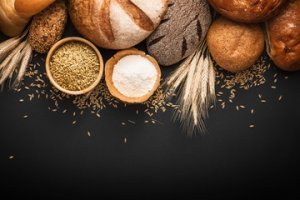
These foods are made with either whole grains or refined (processed) grains. When selecting your portion sizes from the grains group you should aim to make them whole grains versus processed.
The less processing the more nutrients you will get from your foods. During the processing of grains, valuable nutrients are removed like dietary fiber, iron and many B vitamins.
Daily Recommended Grain Servings
Women| Age | Daily Recommendation | Minimum Amount |
| 19 - 30 | 6 ounce equivalents | 3 ounce equivalents |
| 31 - 50 | 6 ounce equivalents | 3 ounce equivalents |
| 51 + | 5 ounce equivalents | 3 ounce equivalents |
Men
| Age | Daily Recommendation | Minimum Amount |
| 19 - 30 | 6 ounce equivalents | 3 ounce equivalents |
| 31 - 50 | 6 ounce equivalents | 3 ounce equivalents |
| 51 + | 5 ounce equivalents | 3 ounce equivalents |
Portion Sizes for Grains
Here are some typical 1 ounce servings of grains.
- 1 Slice of Bread
- 1 Cup Cold Cereal
- 1/2 Cup Cooked Rice, Pasta and Cooked Cereal
- 1 "Mini" Bagel or 1/4 Large Bagel
- 5 Whole Wheat Crackers
- 1/2 English Muffin
- 3 Cups Popcorn
- 1 Pancack (4 1/2 inch diameter)
- 1 Tortilla (6 inch diameter)
Back to List
Vegetables Portion Sizes
Veggies are a great source of fiber and vitamins and help make you feel fuller. These low calorie foods are a great addition to any weight loss plan.
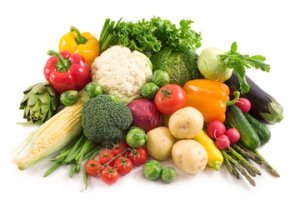
Some vegetables are higher in carbohydrates than others and in fact, the diabetic food pyramid includes these higher carb veggies in their grains, breads and other starches food group. You can read this article on diabetic diets to learn more about their food pyramid.
Foods in this group include any vegetable and 100% vegetable juices. The group is divided into 5 subgroups based on their nutrient content.
These groups are dark green, orange, dry beans and peas, starchy and other vegetables. You should try to get in more dark green and orange vegetables as this offers the most nutritional value.
Some common dark green veggies include broccoli, spinach, turnip and collard greens, watercress and Romaine lettuce. Orange veggies include acorn squash, carrots, pumpkin, sweet potatoes and butternut squash.
Daily Recommended Servings
Women| Age | Daily Recommendation |
| 19 - 30 | 2 1/2 cups |
| 31 - 50 | 2 1/2 cups |
| 51 + | 2 Cups |
Men
| Age | Daily Recommendation |
| 19 - 30 | 2 1/2 cups |
| 31 - 50 | 2 1/2 cups |
| 51 + | 2 Cups |
A serving of vegetables is 1 cup raw or cooked veggies or 1 cup of 100% vegetable juice. Additionally 2 cups of raw leafy greens is considered 1 cup or 1 serving. Here are some other typical serving sizes for vegetables equal to one cup.
- 3 Spears of Broccoli
- 2 Medium Carrots or 12 Baby Carrots
- 1 Large Ear of Corn
- 1 Medium Potato
- 2 Large Stalks of Celery
- 1 Large Pepper
- 1 Large Tomato
Fruit Portion Sizes
In this food group are all fruits and 100% fruit juices.
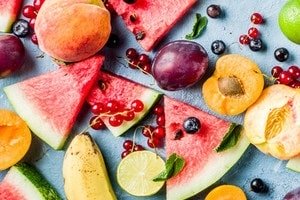
Fruits offer lots of nutritional value and are a healthy choice. Your fruit servings can be fresh, canned, frozen or dried.
Be sure to read the ingredients for any canned, frozen or dried fruits to see if any additional ingredients, such as sugar, have been added. It’s best to buy these where they are packaged in their own fruit juices.
Eating fruit improves heart health, reduces inflammation, and boosts your immune system. Some of the healthier fruits include pineapple, apples, blueberries and mangos.
Daily Recommended Servings
Women| Age | Daily Recommendation |
| 19 - 30 | 2 cups |
| 31 - 50 | 1 1/2 cups |
| 51 + | 1 1/2 cups |
Men
| Age | Daily Recommendation |
| 19 - 30 | 2 cups |
| 31 - 50 | 2 cups |
| 51 + | 2 cups |
Portion Sizes for Fruits
A typical serving for fruits is 1 cup of fruit or 100% fruit juice. For dried fruits, 1/2 cup is considered a 1 cup serving. Here are some other typical serving sizes for fruits equal to one cup.
- 1/2 Large or 1 Small Apple
- 1 Large Banana, Orange, Peach
- 1 Medium Grapefruit or Pear
- 32 Seedless Grapes
- 3 Medium or 2 Large Plums
- 1 Small Wedge of Watermelon
- 8 Large Strawberries
Protein Portion Sizes
This group includes all foods made from meat, poultry and fish. Also included are dry beans or peas, eggs, nuts and seeds.
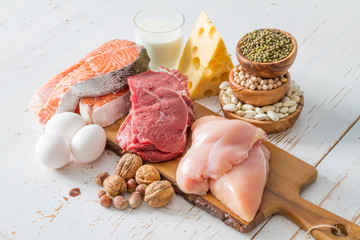
The dry beans and peas are both in this group and the vegetable group. Your meat and poultry selections should be lean cuts or low fat. In fact if you are following Weight Watchers, the skinless chicken breast portion may be zero points depending on your plan.
Fish, nuts and seeds are a great source of your healthy fats like Omega-3 fatty acids so you should select these foods often. Omega-3 Fatty acids are a great energy source and help keep your heart, lungs, blood vessels, and immune system working the way they should.
Daily Recommended Servings
Women| Age | Daily Recommendation |
| 19 - 30 | 5 1/2 ounce equivalents |
| 31 - 50 | 5 ounce equivalents |
| 51 + | 5 ounce equivalents |
Men
| Age | Daily Recommendation |
| 19 - 30 | 6 1/2 ounce equivalents |
| 31 - 50 | 6 ounce equivalents |
| 51 + | 5 1/2 ounce equivalents |
Protein Serving Sizes
A 1 ounce equivalent is equal to 1 ounce of meat, poultry or fish, 1/4 cup cooked dry beans, 1 tablespoon of peanut butter, 1 egg or a 1/2 ounce of nuts or seeds. Here are some common portion sizes and ounce equivalents.
- 1 small steak is about 3 1/2 to 4 ounce equivalents
- 1 small chicken breast equals 3 ounce equivalents
- 1 can of tuna is 3 to 4 ounce equivalents
- 1 small trout equals 3 ounce equivalents
- 1 cup split pea, lentil or bean soup is about 2 ounce equivalents.
Dairy Portion Sizes
This group includes milk and products made with milk. However, products made with milk that do not retain or have very little calcium are not in this group. These include butter, cream cheese and cream.
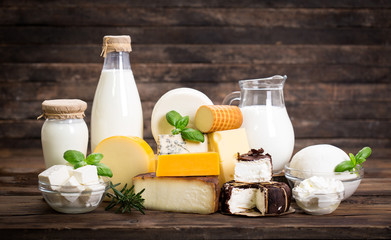
The foods in this group include both liquid milk products as well as solid milk products.
Typical foods in this group include milk, yogurts, cheeses and milk based desserts like pudding, ice cream and ice milk. When selecting milk products you should look for fat free or low fat products.
Foods in the Dairy Group provide nutrients such as calcium, potassium, vitamin D, and protein. This helps to build and maintain strong bones.
Daily Recommended Servings
Women| Age | Daily Recommendation |
| 19 - 30 | 3 cups |
| 31 - 50 | 3 cups |
| 51 + | 3 cups |
Men
| Age | Daily Recommendation |
| 19 - 30 | 3 cups |
| 31 - 50 | 3 cups |
| 51 + | 3 cups |
Portion Sizes for Dairy
A cup of food in the dairy group is 1 cup of milk or yogurt, 1 1/2 ounces of natural cheese and 2 ounces of processed cheese. Here are some other typical servings of dairy foods.
- 1/2 cup Evaporated Milk
- 1 Regular 8 ounce Yogurt
- 1/3 Cup Shredded Cheese
- 1/2 Cup Ricotta Cheese
- 2 Cups Cottage Cheese
- 1 1/2 Cups Ice Cream
Fat portion sizes
This is not an official "MyPlate" food group but you should be aware of the recommended portions for this category.
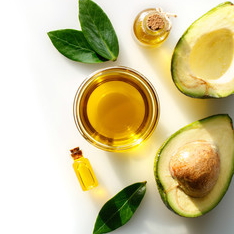
You should try limiting solid oils like butter, margarine, lard and shortening. Foods that would be included in this group are mayonnaise, salad dressings, and margarine.
Look for items with zero trans fat. Do not elimate all fats as your body does need certain fats. Since your body cannot produce some essential fatty acids on it’s own, it needs some help from your food intake. Also, fat helps give you that feeling of being full and satisfied.
Daily Recommended Allowance
Women| Age | Daily Recommendation |
| 19 - 30 | 6 teaspoons |
| 31 - 50 | 5 teaspoons |
| 51 + | 5 teaspoons |
Men
| Age | Daily Recommendation |
| 19 - 30 | 7 teaspoons |
| 31 - 50 | 6 teaspoons |
| 51 + | 6 teaspoons |
Portion Sizes for Fats and Oils
Here are some common portion sizes and teaspoon equivalents for oils.
- 1/2 medium avocado equals 3 teaspoons
- 4 large olives is about 1/2 teaspoon
- 1 ounce peanuts, mixed nuts, cashews, sunflower seeds or almonds equals 3 teaspoons.
- 1 ounce hazelnuts equals 4 teaspoons
Learning to manage your portions and making the proper food choices you can begin to eat healthier and help lose weight. For more on portion sizes, visit the myplate.gov
Additional Articles
Food Groups
In addition to the proper portion sizes you want to ensure your plate covers the correct food groups. Read this article to learn more.
Reading Food Labels
Learning to read food labels can help you better understand the nutritional values and portions for the foods you buy.
Diabetes Food Pyramid
If you are a diabetic, then be sure to check out this food pyramid.